
WDIA: Understanding the Threat Landscape
Preventing & Responding to Cyber Attacks
Businesses of all sizes are frequent targets for cyber attacks due to the value of their data, reliance on technology and growing digital footprints. Many dental practices have limited budgets and resources, making them especially vulnerable to threats like ransomware, business email compromise, and other forms of cybercrime.
To reduce cyber risk, organizations should focus on prevention first. Establishing strong security controls, employee awareness, and clear procedures can significantly decrease the likelihood of a successful attack. The following measures represent key steps organizations can take to strengthen their cybersecurity posture.
Proactive Steps to Help Prevent Cyber Attacks
- Enforce multi-factor authentication (MFA) to secure user access.
- Keep systems patched and updated to close known vulnerabilities as they are found.
- Use secure VPNs and limit remote access to verified users and devices only.
- Protect against ransomware and phishing with endpoint security software, staff awareness training, and regular phishing simulations.
- Ensure backups are stored offsite, tested regularly, and included in your disaster recovery planning.
- Monitor logs and network activity to detect anomalies and signs of intrusion early.
- Develop and maintain a cyber incident response plan (IRP) and a specific ransomware response plan.
- Adopt a recognized security framework such as NIST, HITRUST, or ISO 27001 to establish best practices.
- Ensure access to systems and data is only granted to appropriate staff and access is reviewed regularly.
- Have policies and procedures in place so cyber security is consistent across the company or organization.
- Conduct regular cybersecurity drills.
Even with strong preventative controls in place, no organization can eliminate cyber risk entirely. For this reason, preparedness and rapid response are equally important components of a comprehensive cybersecurity strategy.
Response: Best Practices for Responding to a Cyber Attack
Speed and preparation are critical when it comes to responding to an attack. While not every attack can be prevented, having the right procedures in place—including a well-rehearsed incident response plan—can significantly reduce the damage. A prepared organization can quickly detect threats, contain them before they spread, and recover faster, protecting critical systems, data and staff. In the event of an attack, you should:
- Activate your Cyber Incident Response Plan (IRP) immediately
- Contact your insurance broker or insurance carrier if you have cyber insurance
- Isolate affected systems to prevent the spread of malware
- Engage your internal or external cybersecurity team
- Notify law enforcement, regulatory bodies and other key stakeholders as appropriate
- Preserve evidence for forensic investigation
- Communicate clearly with staff, clients, and partners
- Do not rush to pay a ransom — explore recovery options first
Building Long-Term Resilience & Threat Readiness
To build long-term resilience, organizations need to go beyond basic cyber hygiene and integrate cybersecurity into everyday operations. Implementing clear frameworks, preparing for real-world attack scenarios, and staying up to date with emerging threats are critical to maintaining a high level of readiness. These proactive steps are essential to establishing a strong, sustainable defense posture across the entire organization.
Among today’s cyber threats, ransomware remains one of the most disruptive and costly forms of attack. Organizations that prepare in advance are far more likely to recover quickly and minimize operational disruption.
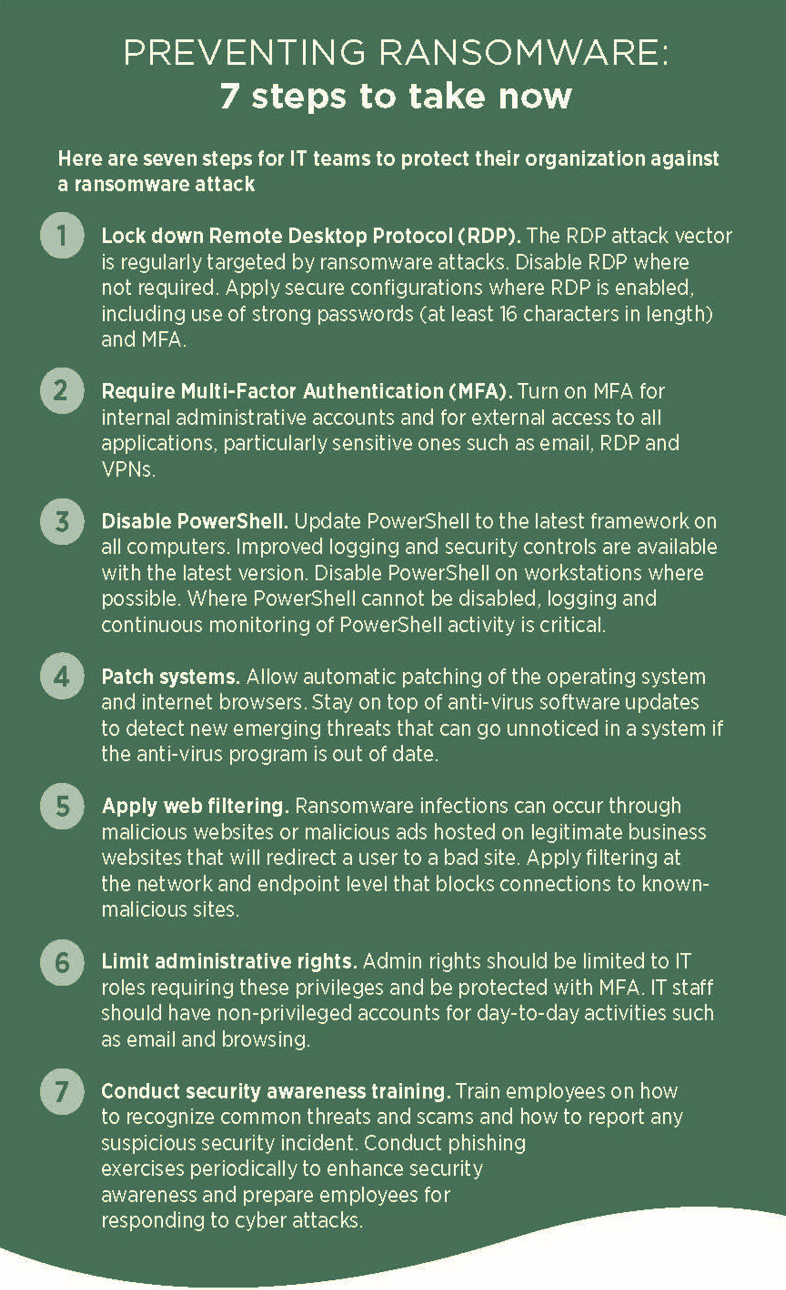
Preventing Ransomware: Prepare Now to Recover Later
Unfortunately, it is not always possible to prevent a ransomware infection, but IT departments can position their organization for a faster, smoother recovery.
BACK UP YOUR DATA
- A well-thought-out backup and restoration plan is one of the most important countermeasures against ransomware. Back up data regularly and maintain copies offline and/or in cloud storage. Use unique credentials to secure your backups, and store the credentials separately from other user credentials. Encrypt backups, especially when stored offsite at a third-party location or in a cloud environment.
TEST BACKUPS
- Test backups periodically to validate that recovery is in line with the organization’s recovery point and recovery time objectives. Implement automated monitoring that notifies when backups are not functioning correctly.
DEVELOP A BUSINESS CONTINUITY PLAN (BCP)
- Effective business continuity planning helps identify how to carry out essential operations in the event of a business interruption caused by ransomware.
While ransomware targets the availability of systems and data, organizations must also be prepared to defend against attacks that target financial transactions and employee trust. One of the most common examples is Business Email Compromise.
Business Email Compromise: Best Practices for Prevention
What is business email compromise?
Business email compromise is an attack in which a cybercriminal uses compromised email credentials or spoofs a legitimate email address in order to induce an employee to make a wire transfer or other electronic payment to a bank account controlled by the cybercriminal or, in some cases, to transfer sensitive data such as W-2 forms.
What is fraudulent instruction?
Fraudulent instruction is the written or electronic instruction intended to mislead the recipient.
How can you reduce the risk of financial losses?
- For employees who frequently travel and are authorized to request funds transfers, establish a process to confirm requests. For example, set up a predetermined code that a request must include that is not documented within the network. (You don’t want a criminal who has access to your network to be able to search for your process.)
- Provide periodic anti-fraud training that teaches employees to detect and avoid phishing and social engineering scams.
- If a vendor or supplier requests changes to its account details (including, but not limited to, bank routing numbers, account numbers, telephone numbers, or contact information):
- Confirm all requests by a direct call to the vendor or supplier. Make sure to use a phone number the vendor or supplier provided before the request was received.
- Before making any changes, send notice of receipt of the request to someone other than the person who sent the request.
- Require review of all requests by a supervisor or next-level approver before making any changes.
- If the request is from a vendor, check for changes to business practices:
- Were earlier invoices mailed while the new one was emailed?
- Were earlier payments by check and now the request is for a wire transfer?
- Did a current business contact ask to be contacted via their personal email address when all previous official correspondence used a company email address?
- Is the address or bank account to which the payment is to be sent different from previous payments to that vendor?
- Be suspicious of small changes in email addresses that mimic legitimate email addresses:
- For example, .co vs. .com, abc-company.com vs. abc_company.com, or hijkl.com vs. hljkl.com.
- If you receive an email that looks suspicious, forward it to IT for review.
- If the request is for a funds transfer, confirm that the request is consistent with how previous funds transfer instructions have been requested:
- Does the Owner, CEO or CFO directly request a wire payment?
- Is the request consistent with earlier wire payments – including the timing, frequency, recipient, and country to which prior wires have been sent?
- Establish an out-of-band verification process to confirm the identity of the person requesting a funds transfer:
- If the request is by email, then call and speak to the person using a pre-established phone number to get a verbal confirmation.
- If the request is by phone call or fax, then use email to confirm using an email address known to be correct.
- Instead of using “Reply,” forward the email and type in a known email address.
- Do not reply to the email or “verify” using the phone number in the email. If the request is fraudulent, the criminal will have supplied fake contact information, too.
- Limit the number of employees who have the authority to submit or approve wire transfers.
- Establish dual approvals for financial transactions. The two parties responsible for dual approvals should not have a supervisor/subordinate relationship as it will undermine the effectiveness of the process.
- Implement two-factor authentication for remote access to your email system.
- If you do not have written procedures, develop them.
By combining strong preventive controls, effective incident response planning, ransomware preparedness, and safeguards against business email compromise, organizations can significantly reduce their exposure to cyber threats and improve their ability to recover when incidents occur. Cybersecurity is not a one-time initiative, but an ongoing process that requires attention, training, and commitment across the entire organization.
If you would like more information on how to protect your dental practice with Cyber Liability coverage, please call Washington Dentists Insurance Agency (WDIA) at 800-282-9342, email info@wdiains.com.
Claims handling and breach response services are provided by Beazley USA Services, a member of Beazley Group. Beazley USA Services does not underwrite insurance for MedPro Group. Policies purchased through MedPro Group are subject to MedPro Group’s underwriting processes. WDIA - 9/15/2026
